Tiny Times Square: Turning a City Block into a Toy Set
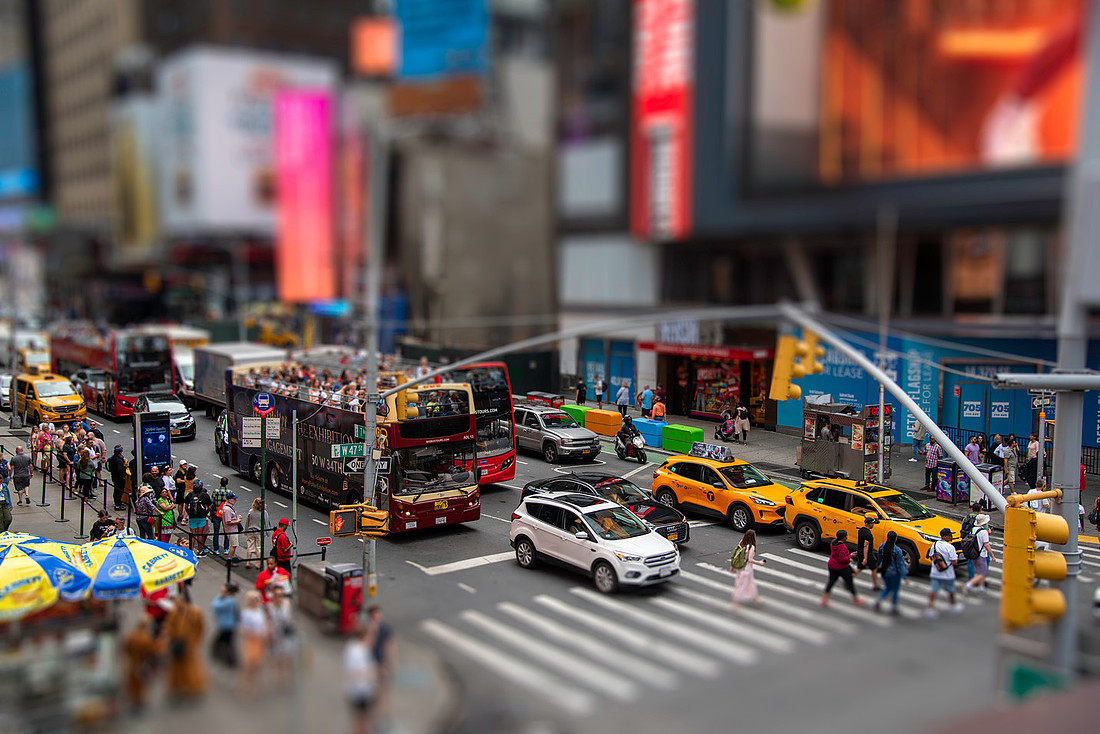
From the right perch, New York’s biggest stage can look like a tabletop model. This photo from Times Square—taxis, tour buses, and a stream of pedestrians crossing at W 47th St—was shot and edited to mimic a miniature diorama using a tilt-shift look. The result: everyday chaos feels like a tiny, perfectly staged scene.

Why this looks like a miniature
Our eyes expect wide city scenes to have deep focus. Miniatures, by contrast, are usually photographed up close with very shallow depth of field. By selectively blurring most of the frame and keeping a narrow band razor-sharp (the crosswalk and center lane, here), the brain reads “small scale.” A few extra cues push it over the top:
-
High, downward angle — like you’re looking into a display case.
-
Punchy color and contrast — taxis, traffic lights, and billboards pop like painted models.
-
Frozen motion — crisp edges make the “toy cars” feel placed, not moving.
How I created the tilt-shift effect
-
Pick the vantage point. I shot from an elevated position looking slightly downward so the street planes stack visually (crosswalk, cars, sidewalks).
-
Define the focus band. In post, I placed a horizontal focus strip across the crosswalk and center traffic, letting areas above and below fall quickly out of focus.
-
Apply gradient/tilt blur. A lens-style blur with soft transitions mimics a tilted plane of focus. I kept faces and key edges within the sharp band.
-
Miniature color grading. A modest boost to saturation/contrast (especially yellows and reds), plus a touch of clarity in the sharp zone, makes objects feel “painted.”
-
Finish with selective sharpening. Sharpen only inside the focus band so the effect reads clean rather than “over-processed.”
(Tools: Lightroom for base adjustments; Photoshop’s Tilt-Shift/Lens Blur for the selective blur; masks to protect the focus band.)
Compositional choices that help
-
Crosswalk stripes read like scale-model decals and guide the eye.
-
Yellow cabs are iconic, instantly recognizable at any size.
-
Layered activity (tour buses, vendors, pedestrians) gives the “model city” a packed, playful feel.
Quick tips to try this yourself
-
Shoot from high and slightly top-down; avoid eye-level.
-
Keep your focus band narrow and deliberate—roughly along the subject line you want the viewer to read as “real.”
-
Don’t over-blur. The trick is just enough falloff to fool the eye.
-
Boost micro-contrast and saturation in the sharp zone; keep the blurred areas flatter.
-
Watch for clean edges (crosswalks, lane lines, taxis) to sell the effect.
Tech notes (for the gearheads)
-
Focal length: a short telephoto often compresses the scene nicely.
-
Shutter: fast enough to freeze people and cars enhances the “placed objects” vibe.
-
Aperture: the blur is created in post here, so in-camera f-stop is less critical than getting a crisp base file.
